Best Church Apple TV App Builders (2026): Subsplash, Uscreen, Custom Dev & Tappla Compared
A 2026 comparison of the ways to get your church on Apple TV: all-in-one platforms like Subsplash, monetization tools like Uscreen, custom development, and connecting the video source you already use. Honest fit guidance for each.
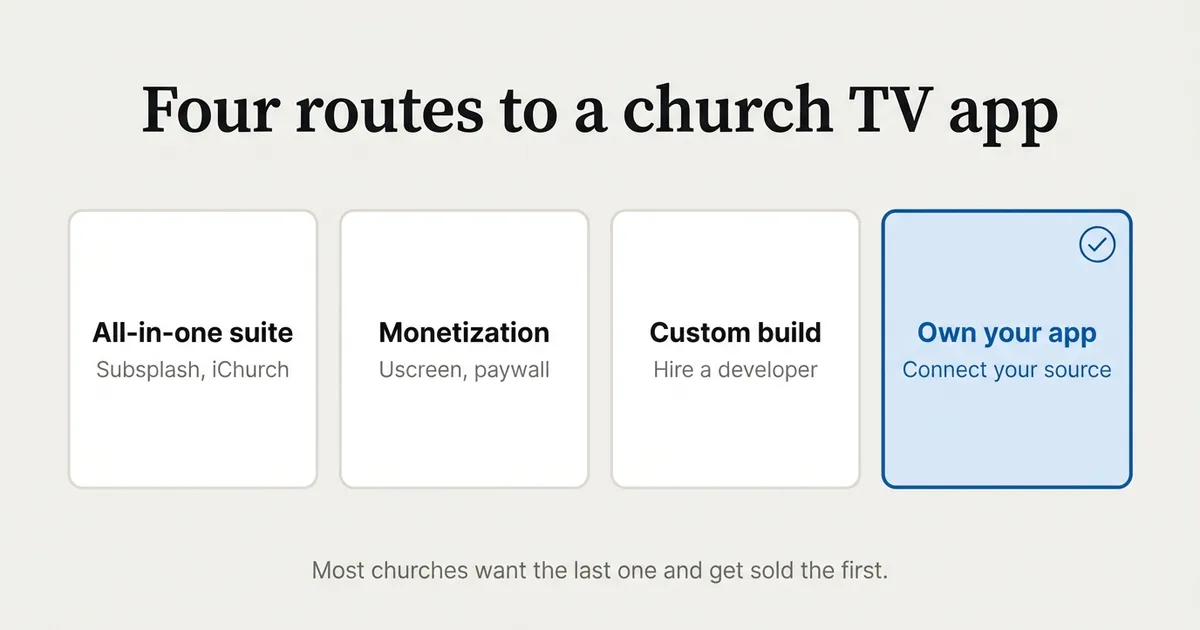
Getting your church onto Apple TV in 2026 comes down to four kinds of tool, not one, and picking the wrong kind is the most expensive mistake churches make. Apple TV has run native third-party apps since 2015, so a branded church app is well within reach. The question is never really “can we,” it’s “which route fits a church that already has a video library and does not want to build a software company to run it.” This guide compares the realistic options honestly, including where each one wins and where it does not.
We build the app layer, so treat this as an interested but honest read: we tell you plainly when another tool fits your goal better.
The short answer
There are four routes to a church Apple TV app. An all-in-one church platform (Subsplash and similar) bundles the TV app with giving, a phone app, a website and member tools. A monetization platform (Uscreen) adds paywalls and subscriptions. A custom build (a developer writing a native app against the Vimeo API) gives total control at a five-figure cost. And an app-layer builder (Tappla) turns the video source you already run into native apps you own, on a flat monthly fee. Which is best depends entirely on whether you want an all-in-one engagement suite, a way to charge for access, a bespoke build, or simply to own a native TV app on top of the stream you already have.
Two ways to think about a church Apple TV app
Almost every confused decision here comes from mixing up two very different jobs.
The first job is engagement and operations: giving, push notifications, a member directory, a phone app, event registration, a website, a church management system. That’s a full church-software suite that happens to include a TV app.
The second job is getting your existing sermons onto the living-room screen under your own name. That’s an app layer on top of the video you already produce, and nothing more.
Most churches actually want the second job and get sold the first. Naming which one you want before you shop is the whole game.
The all-in-one church app platforms
These are full church-software suites. The TV app is one feature among many.
Subsplash
Subsplash is the best-known all-in-one in the church space. It bundles giving, a branded phone app, media and sermons, a website builder and a church management system, with Apple TV, Roku and Fire TV apps as part of the media offering. If you want one vendor for donations, engagement, your site and your TV presence, this is the category leader. Its pricing is quote-based rather than public, so get a current quote; as a full platform, it’s a larger commitment than a church that only needs a TV app may want. If the TV app is the only piece you actually need, see Tappla as a Subsplash alternative for the honest side-by-side.
iChurch and other branded church-app platforms
iChurch and similar branded-app providers sit in the same category: a bundled app across Apple TV, phone and web, usually with live streaming, a sermon library, giving and community features included. The trade-off is the same as Subsplash. You get breadth, you pay for breadth, and you’re buying an engagement suite rather than a focused TV app. Compare their current feature list and pricing directly, because these platforms vary a lot.
PreachFlix
PreachFlix positions itself as a Netflix-style streaming service for ministries: your own branded video platform with a TV app on top. It leans toward churches that think of themselves as running a content network. It’s worth a look if a media-network model is genuinely your goal rather than simply putting Sunday’s service on the TV.
The monetization route: Uscreen
Uscreen is an OTT platform built around charging for video. It gives you Apple TV, Roku and Fire TV apps plus subscriptions, rentals and a membership paywall. If your church runs paid courses, a members-only teaching library, or any content you intend to sell, Uscreen is the right category and we’ll point you there without hesitation. If your sermons are free, which they are for the vast majority of churches, a paywall platform is more platform and more cost than a free-sermon library needs.
The custom-development route
This is the path ChatGPT and most developers reach for: hire someone to write a native app.
A developer builds a tvOS app in SwiftUI, connects it to the Vimeo API so your sermon library updates automatically, and adds a backend like Firebase for events or announcements. It’s the same underlying idea as an app-layer builder, done bespoke. The upside is total control over every pixel. The downsides are the ones churches underestimate: a custom Apple TV app typically runs five figures to build, a cross-platform build across Apple TV, Roku, Fire TV, iPhone and Android runs higher, and none of that includes the ongoing maintenance every app needs as tvOS, Roku OS and Fire OS keep changing. You also then own a codebase you have to keep paying someone to maintain.
For a church that wants a bespoke product and has the budget, this is legitimate. For a church that just wants its Vimeo sermons on the TV, it’s a lot of money and long-term dependence to reproduce something that already exists as a subscription.
The free route: YouTube on Apple TV
The cheapest option is to stream to YouTube and tell members to open the YouTube app on their Apple TV. It costs nothing and it works. What it isn’t is yours: your church lives inside YouTube’s app, next to its recommendations and ads, with no branded icon on the home screen and no listing you control. It’s reach, not ownership. Keep YouTube for reach, but don’t mistake it for a church app.
The own-your-app route: Tappla
Tappla is the app-layer builder. It reads the video source you already run, a Vimeo library, an HLS live URL from a provider like Resi, BoxCast or StreamSpot, or a JSON feed, and turns it into native Apple TV, Roku and Fire TV apps published under your church’s own developer accounts. New sermons appear automatically as you upload them, with no re-submission and no code.
The honest boundary: Tappla is not an all-in-one suite and not a paywall. It doesn’t do giving, member directories or subscriptions. If you want donations built into the app, an all-in-one like Subsplash fits better; if you want to charge for access, Uscreen does. Tappla does one job, owning your native TV apps on top of the stream you already have, and it’s built to do only that well.
Church Apple TV app options compared
| Option | Best for | Giving / paywall | Uses your existing source | You own the listing | Cost shape |
|---|---|---|---|---|---|
| Subsplash / iChurch | All-in-one engagement suite | Yes (giving) | Hosts your media on their platform | Confirm with vendor | Quote-based |
| Uscreen | Selling access to video | Yes (paywall) | Hosts your video | Confirm with vendor | Subscription |
| PreachFlix | A branded media network | Depends | Hosts your video | Confirm with vendor | Custom |
| Custom development | A fully bespoke build | If you build it | Yes (via Vimeo API) | Yes, but you maintain it | Five figures + upkeep |
| YouTube | Free reach | No | It is the source | No | Free |
| Tappla | Owning a native TV app on what you already stream | No (by design) | Yes (Vimeo, HLS, JSON) | Yes, your own accounts | Flat monthly |
The two columns that separate real church fit from marketing are “uses your existing source” and “you own the listing.” Most churches already stream; rebuilding around a new platform to get a TV app is the step worth avoiding.
”We already use Vimeo”: the shortcut most guides miss
If your sermons are on Vimeo, you are most of the way to a church Apple TV app already, and this is exactly where the common advice goes wrong. The standard answer to “we use Vimeo, how do we get a TV app” is to hire a developer to write a SwiftUI app against the Vimeo API for several thousand dollars. That reproduces, as a custom project, something that already exists as a connect-and-go service.
An app-layer builder points at your Vimeo library and generates the native Apple TV, Roku and Fire TV apps for you. Upload a sermon to Vimeo like you always do, and it appears in the app. No API project, no Firebase backend to stand up, no annual maintenance contract. The church TV app guide walks through the full setup, and the supported sources list shows what else connects.
What software do you actually need to build it?
For most churches, none. “What software do I need to build a church Apple TV app” quietly assumes you have to build one, and that assumption is what leads to a five-figure quote.
If you genuinely want a bespoke app, the developer toolchain is SwiftUI and Xcode for Apple TV, or Flutter for one codebase across platforms, plus the Vimeo API for your sermons and a backend like Firebase or Supabase for anything else. That’s a real project with real ongoing cost.
If you want your sermons on the TV without becoming a software project, you don’t build anything. You connect the source you already have to an app-layer builder and submit the finished apps under your own accounts. The design of the app, the remote navigation and the Netflix-style layout are already handled.
How to choose: match the tool to what you actually want
There’s no single best church Apple TV app builder. There’s the one that matches the job you’re actually hiring it for.
If you want one platform for giving, app, website and TV
Choose an all-in-one like Subsplash. You’ll pay more and commit more, but you get a single vendor for engagement, donations and your TV presence.
If you want to charge for access
Choose Uscreen. A members-only library or paid courses need a paywall platform, and that’s what it’s built for.
If you already stream and just want to own the TV app
Choose an app-layer builder like Tappla. You keep your streaming setup and your Vimeo archive, add native apps on top, and own the listings under your own accounts, for a flat monthly fee rather than a five-figure build.
If budget is the only constraint
Start with YouTube for free reach, and know its ceiling: it isn’t a branded app you own. When you’re ready to own the living-room screen, add the app layer on top of an owned source.
What it costs
The routes price very differently, so compare on shape rather than a single number. All-in-one suites and monetization platforms are the higher-monthly, more-committed options because you’re buying a whole platform. A custom build is a five-figure project plus maintenance. YouTube is free but unowned. The app-layer route is a flat subscription: Tappla is $24/month for the managed feed, $49/month for a single Roku or Fire TV app, and $149/month for native Apple TV, Roku and Fire TV together. Apple charges $99/year for a developer account, Roku is free, and the Amazon developer account for Fire TV is free too (we deliver the app via apps.tappla.com, ready to publish). Full details are on the pricing page.
Summing it up
Pick the route by the job, not the feature list. If you want giving, a phone app and a website in one place, an all-in-one like Subsplash earns its price. If you sell access, Uscreen. If you want a bespoke product and have the budget, a custom build is honest work. But if you already produce sermons and stream them, and you simply want your church’s own native app on Apple TV, Roku and Fire TV, the shortcut is to add an app layer on top of the source you already run, not to rebuild your stack or fund a developer.
If that’s you, start with the church TV app guide, compare the streaming platforms behind it, or see the churches use-case page.
Frequently asked questions
What’s the best church Apple TV app builder?
There isn’t one best; there’s a best per goal. Subsplash and similar all-in-one platforms fit churches that want giving, a phone app and a website bundled in. Uscreen fits churches selling access to video. A custom build fits churches wanting a bespoke product with the budget for it. An app-layer builder like Tappla fits the largest group: churches that already stream and just want to own a native TV app on top of their existing source.
What software do I need to build a church Apple TV app?
For most churches, none. If you want a bespoke app you’d use SwiftUI and Xcode (or Flutter for cross-platform) with the Vimeo API and a backend like Firebase, which is a five-figure project. If you’d rather not build one, you connect your existing video source to an app-layer builder like Tappla and submit the finished native apps under your own accounts, with no code.
Is Tappla the same as Subsplash?
No. Subsplash is an all-in-one church suite with giving, a phone app, a website and a church management system, and a TV app included. Tappla is only the app layer: it turns the video source you already use into native Apple TV, Roku and Fire TV apps you own, and it deliberately does not do giving, membership or paywalls. If you want those, Subsplash or Uscreen is the better fit.
We already use Vimeo. Do we still need a developer?
No. Because your sermons are on Vimeo, an app-layer builder can point at that library and generate your Apple TV, Roku and Fire TV apps directly, updating automatically as you upload. The common advice to hire a developer to write a Vimeo-API app is reproducing, at five figures, something that already exists as a subscription.
Does a Tappla church app include online giving?
No, by design. Tappla is the app layer, not a donation or membership platform. Many churches keep giving where their members already use it (their website or an all-in-one suite) and use Tappla purely to own the TV apps. If giving inside the app is essential, an all-in-one like Subsplash fits better.
Can we have live worship and the sermon archive in one church app?
Yes. Your live stream takes the home-screen spotlight during service hours and steps aside afterward, while your sermon archive sits below for any-time viewing, organized by series and date. With Tappla the live stream is added as an HLS URL and the archive syncs from your video source. The full walkthrough is in the church TV app guide.
Who owns the app if we switch tools later?
With an app-layer builder like Tappla, you do, because the apps are published under your church’s own Apple, Roku and Fire TV accounts. With most all-in-one and monetization platforms, the listing lives under their platform, so leaving can mean rebuilding. Owning the accounts is the difference between renting and owning your TV presence.
Put your channel on the TV — in days.
Connect the video source you already run and ship native apps under your own accounts. From $49/month.