How to Put Vimeo Videos on Roku, Apple TV & Fire TV
How to turn your Vimeo videos into native Roku, Apple TV, and Fire TV apps in 2026: connect your account, showcases become playlists, no re-uploading.
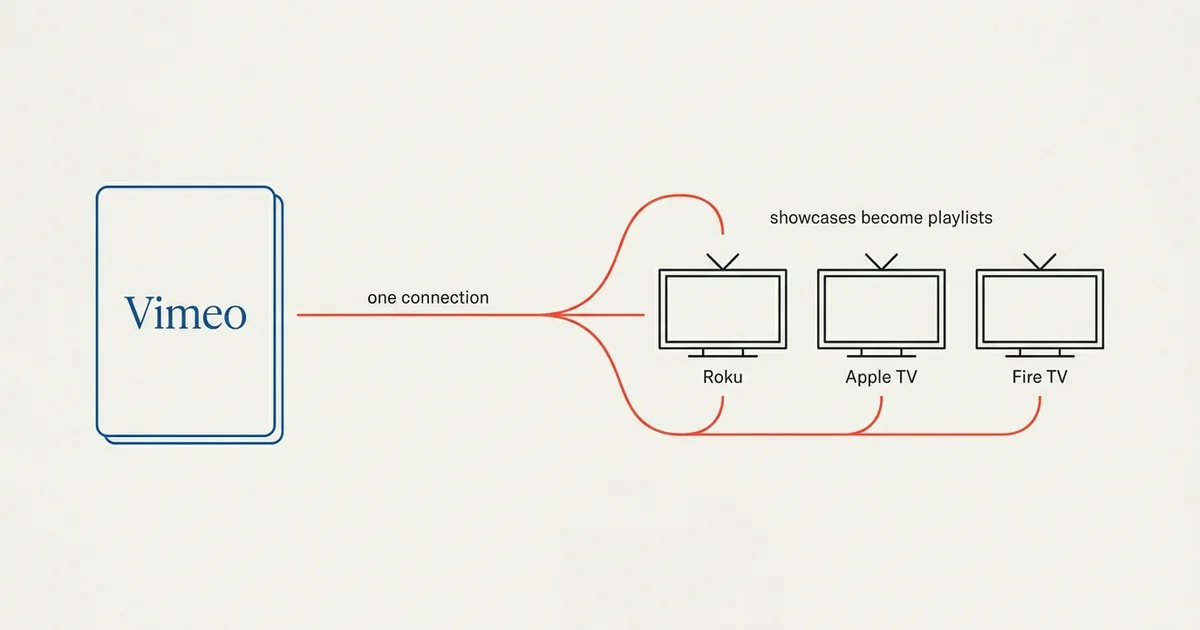
Vimeo is a video host, and a TV app can read from it directly. As of July 2026, Tappla connects a Vimeo account to native apps on all three major living-room platforms, Roku, Apple TV, and Fire TV, in one step, and syncs your showcases, videos, and thumbnails automatically.
This guide covers what you need on the Vimeo side, how your showcases and folders become playlists, how the sync keeps the app current, and a step-by-step from a Vimeo library to a branded app on all three platforms. If your video already lives on Vimeo, this is the shortest path to the TV.
Why Vimeo works for a TV app
A native TV app has two requirements: streamable video and a readable library. Vimeo meets both. It serves adaptive HLS that Apple TV, Roku, and Fire TV can play, and it exposes your videos and their organization through an API a builder can read.
Vimeo vs. YouTube for a TV app
That’s the difference between Vimeo and a platform like YouTube. Vimeo lets an app read and stream your library; YouTube does not, which is why you can’t build a TV app straight from a YouTube channel. See our guide to the best video hosting for building a TV app for how the sources compare.
What you need on the Vimeo side
Two things make a Vimeo library ready for a TV app.
A plan with API access
Your Vimeo plan has to include API access to your video files. In practice that means a Vimeo Standard plan or higher; the entry-level plans don’t expose the file access a TV app needs. This is the single most common reason a Vimeo-backed app shows no video, so it’s worth checking first.
An access token
You connect Vimeo to Tappla with an access token from your own Vimeo account. It’s read access to your videos, generated in your Vimeo settings, and it’s what lets the app pull your library.
How your Vimeo organization becomes the app
You don’t rebuild your catalog. The structure you already keep in Vimeo carries through to the TV.
Showcases and folders become playlists
Tappla maps your Vimeo showcases and folders to playlists and rows in the app. The order you set in Vimeo is the order viewers see on the TV, so how you organize in Vimeo is how your app looks.
Titles, thumbnails, and metadata sync automatically
Titles, descriptions, and thumbnails come straight from Vimeo. There’s no manual entry and no re-uploading. Your video stays on Vimeo, and the app reads it.
The app stays in sync
Tappla re-checks your Vimeo library on a schedule. Add a video to a showcase, and it appears in the app on its own, with no re-submission. Your app and your Vimeo library stay in step.
Vimeo on Roku, Apple TV, and Fire TV
One Vimeo connection powers a native app on each platform, under your own accounts.
Vimeo on Roku
Roku is the largest dedicated streaming-device audience, with tens of millions of active accounts. Tappla generates a Roku channel from your Vimeo library, published to the Channel Store under your own free Roku account. See creating a Roku channel.
Vimeo on Apple TV
Tappla builds a native tvOS app from the same Vimeo library and signs it, and you submit it to the App Store under your own Apple Developer account. See Apple TV app development.
Vimeo on Fire TV
Fire TV publishes to the Amazon Appstore under your own free Amazon developer account. Tappla builds, signs, and delivers your Fire TV app via apps.tappla.com with store images and a step-by-step guide, ready to publish. See building a Fire TV app, or the step-by-step Fire TV guide.
Vimeo vs. hosting the video elsewhere
Vimeo is one of several sources Tappla can read, and the right one depends on where you are.
When to stay on Vimeo
If you already manage your videos in Vimeo and pay for a plan with API access, reuse it. Your showcases, organization, and metadata are set, so there’s nothing to move.
When to consider another host
If you’re choosing where to host, or you want a lower-cost option for a pure on-demand library, Bunny Stream connects the same way and turns its collections into playlists. The full comparison is in the best video hosting for a TV app.
The rule is the same across sources: you keep hosting where you already do, and the app reads from it.
Step-by-step: from Vimeo to a TV app
Here’s the whole process end to end:
- Confirm your Vimeo plan. Standard or higher, so the API can read your files.
- Connect Vimeo in Tappla. Add your access token in your Video Source settings.
- Tappla pulls your library. Showcases become playlists; titles and thumbnails flow in.
- Brand the app. Add your logo, colors, icon, and banner.
- We build and sign it. Tappla generates the native apps for Roku, Apple TV, and Fire TV.
- Publish and stay in sync. Ship under your own accounts, and new Vimeo videos appear on their own.
From connecting Vimeo to a branded app is usually a matter of days.
What it costs
Your Vimeo hosting stays on your own Vimeo account, billed by Vimeo. Tappla is separate: a single native app (Roku or Fire TV) is $49/month, all three native platforms together are $149/month, and the managed video feed on its own is $24/month. Full details are on the pricing page.
Summing it up
If your video is on Vimeo, getting it on Roku, Apple TV, and Fire TV means connecting your account once and letting Tappla read it. Your showcases become playlists, your metadata carries through, and the same app ships to all three platforms, kept in sync automatically. Start on the Fire TV app builder, or see how the same connection powers Roku and Apple TV.
Frequently asked questions
Can I put my Vimeo videos on Roku, Apple TV, and Fire TV?
Yes. Tappla connects your Vimeo account and builds a native app for each platform. Your showcases become playlists, and your titles and thumbnails sync automatically, with no re-uploading. One connection powers all three.
Do I need a paid Vimeo plan?
You need a plan with API access to your video files, which in practice means Vimeo Standard or higher. Entry-level plans don’t expose the file access a TV app needs, and that’s the most common reason a Vimeo app shows no video.
Why won’t my Vimeo videos play in the app?
The usual cause is a Vimeo plan without API file access, or an access token that hasn’t been set. Confirm you’re on Vimeo Standard or higher and that your access token is connected. Privacy settings that block API access can also be the issue.
Do my Vimeo showcases become the app’s playlists?
Yes. Tappla maps your showcases and folders to playlists and rows, in the order you set in Vimeo. How you organize your Vimeo library is how your app looks on the TV.
Do I have to move my videos off Vimeo?
No. Your videos stay on your Vimeo account and keep streaming from Vimeo. Tappla only reads the library and builds the app around it, so you keep your host and your billing.
Is Vimeo or Bunny Stream better for a TV app?
Use Vimeo if you already manage your videos there. Choose Bunny Stream if you want a lower-cost place to host an on-demand library and don’t already use Vimeo. Both connect the same way and both turn their collections into playlists.
Can I add live streaming alongside my Vimeo videos?
Yes. A live feed from a provider like Boxcast or Resi can sit alongside your Vimeo on-demand library in the same app, which is common for churches and sports networks.
Put your channel on the TV — in days.
Connect the video source you already run and ship native apps under your own accounts. From $49/month.